For agent builders · MCP
A to-do list for your agents' human
Your agents run across projects, models and vendors. When one finishes, needs a decision or gets stuck, it adds a task to Weeklane and your phone tells you. One inbox, every agent labelled, nothing to host.
https://mcp.weeklane.app/mcpHow it works
- The agent connects to
https://mcp.weeklane.app/mcpand the human signs in once with their Weeklane account (Apple or Google, OAuth 2.1). - The agent calls
add_taskswith short, prefixed titles. Backlog (no day) keeps the human's days untouched. - iPhone and iPad show a notification per change, titled with the agent's name. The human decides on the phone: moves the task to a day, checks it off, or undoes the agent.
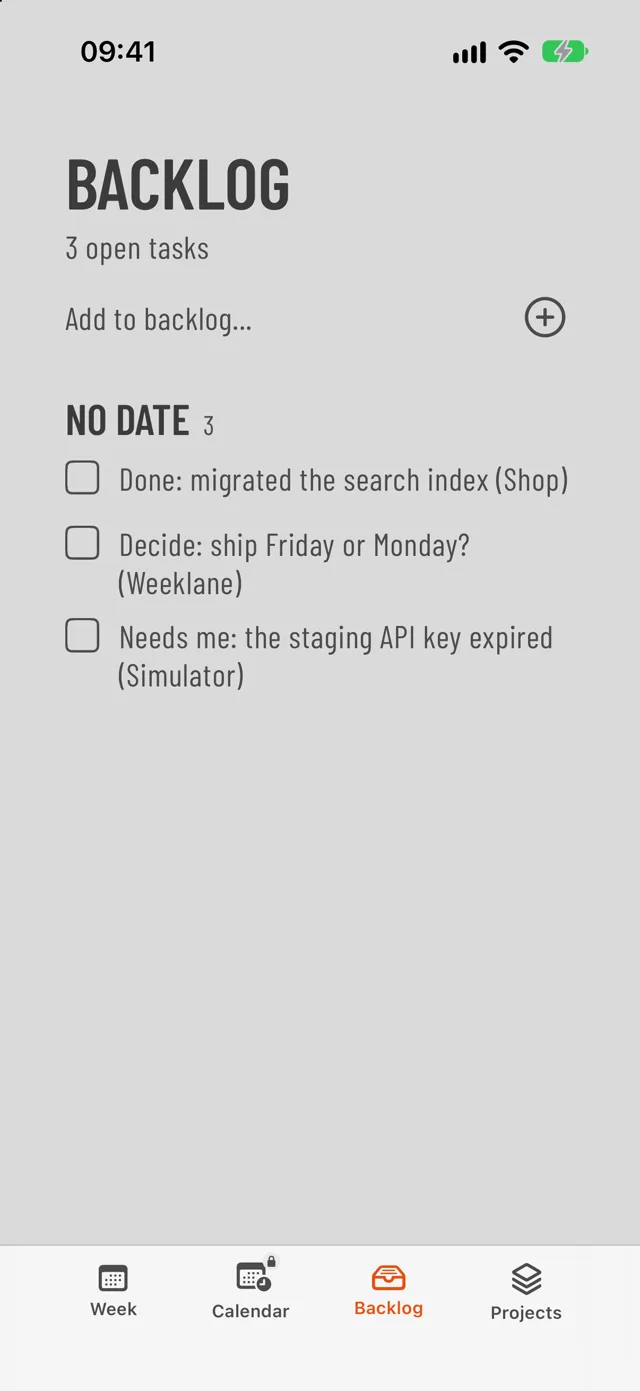
Step by step, with screenshots: Get a phone notification when Claude Code needs you.
Quick start
Claude Code
claude mcp add --transport http weeklane https://mcp.weeklane.app/mcp --scope user
# then inside Claude Code:
/mcp   # choose weeklane, sign in, Allow
Or add it per project in .mcp.json: { "mcpServers": { "weeklane": { "type": "http", "url": "https://mcp.weeklane.app/mcp" } } }
Codex
codex mcp add weeklane --url https://mcp.weeklane.app/mcp
codex mcp login weeklane
Put the agent rules in AGENTS.md.
Gemini CLI
# ~/.gemini/settings.json → mcpServers
"weeklane": { "httpUrl": "https://mcp.weeklane.app/mcp" }
/mcp auth weeklane
Scheduled Claude tasks (cloud)
Connect Weeklane once from Claude's connector directory.
Cloud scheduled tasks include your connectors by default.
An overnight routine can fix what it can and leave you a task for the rest, with your computer off.
Cursor and any MCP client
Remote MCP server, Streamable HTTP: https://mcp.weeklane.app/mcp
OAuth 2.1 with PKCE; dynamic client registration and client ID metadata documents are supported, so nothing to register.
End users connect Claude from the connector directory, ChatGPT from its Plugins directory, and Grok, Perplexity and Le Chat from the Plan with AI page.
Agent rules that work
Paste into CLAUDE.md, AGENTS.md or your rules file. Fixed prefixes make the list scannable, the project in brackets tells agents apart, the cap stops floods, and the last line keeps the human in charge of the days.
## Weeklane (my phone inbox)
Weeklane is my to-do list. Use it to reach me, not to track your own work.
- When you finish a task I gave you, add ONE task to my Weeklane Backlog:
  "Done: <what you did> (<project>)".
- When you need a decision, add ONE task that starts with "Decide:" and
  put the options in the title, e.g. "Decide: ship Friday or Monday? (Weeklane)".
- When something is blocked on me, add "Needs me: <what>, <why> (<project>)".
- Never more than 3 tasks per run. Never complete, move or delete tasks
  you did not add. Never put tasks on a day; I move them myself.
The 20 tools
Every tool has a title, readOnlyHint or destructiveHint, and errors are sentences, not status codes. Days are ISO dates; dayKey: null means the Backlog.
Read
A week grouped by day, one day, the Backlog (tasks without a day), title search from a month back to a year ahead, repeating series, and Task Lock status.
get_weeklist_taskslist_backlogsearch_taskslist_repeating_tasksget_task_lock
Write
Add up to 50 tasks in one call (title, day or Backlog, optional time and reminder), edit, check off, move between days and delete, one at a time or in bulk. Deletes are annotated as destructive.
add_tasksupdate_taskupdate_taskscomplete_taskcomplete_tasksmove_tasksdelete_taskdelete_tasks
Repeating tasks
Daily or weekly series, with skipping a single day.
add_repeating_taskupdate_repeating_taskstop_repeating_taskskip_occurrence
Task Lock (iPhone and iPad)
Turn the Screen Time lock on or off, set when it starts, allow breaks, switch saved block lists. The agent never sees which apps are blocked.
set_task_lockswitch_task_lock_list
Undo
Undo the agent's own most recent change.
undo_last_change
Limits and behaviour
- Changes
- 120 per hour per account
- Requests
- 600 per hour per token
- Tasks per add_tasks call
- 50
- Task title
- up to 500 characters
- Scope
- Days and Backlog of the personal list today; project tasks come in the next release
- Transport
- Streamable HTTP; stateless, so clients may reconnect freely
- Auth
- OAuth 2.1, PKCE S256, refresh tokens rotated; DCR and CIMD; no API tokens yet
Roadmap
- Projects, in the next release: agents read and write project tasks, and can keep their own project (“Claude”, “Codex”) as a notes-for-my-human list.
- Personal API tokens, so cron jobs and CI can post without an OAuth client.
- An
ask_humantool with 2–4 options, answered on the phone and read back by the agent on its next run. - Visible notifications on Android.
Building something that needs one of these first? Tell us.
Questions
- What does the human see?
- On iPhone and iPad, a notification per change titled with the assistant's name (“Claude added ‘Decide: ship Friday or Monday?’”), and the task in the list, marked with who added it. On Android the task and the home screen widget update, with no notification yet. Settings → Plan with AI lists every agent change with Undo and a Revoke button per agent.
- Can the agent get an answer back?
- Not through a dedicated tool yet. An agent can read a task's done state and current title with search_tasks or get_week, so a human can answer by editing the title (“… → Friday”) or checking the task off. An ask-and-answer tool is on the roadmap.
- How do several agents share one inbox?
- Each agent signs in to the same Weeklane account and gets its own OAuth grant. Every change is labelled with the client's name, and each grant can be revoked separately in the app.
- Can a headless job on a server use it?
- If the client stores and refreshes OAuth tokens (Claude Code and Codex do), yes: sign in once on that machine. Pure cron scripts without an OAuth client have no way in until personal API tokens ship.
- Is there a sandbox or a test account?
- Use a second Weeklane account (any Apple or Google sign-in) on a second device or simulator. Plan with AI needs Weeklane Pro, which starts with a free trial.
- What about prompt injection?
- Tool descriptions never ask the model to call other tools or promote anything, writes are rate-limited, deletes are annotated destructive so clients ask first, and the human can undo or revoke at any time. Keep the CLAUDE.md rules above in your own setup too.
Privacy: Weeklane does not sell tasks or use them to train AI. Details in the privacy policy.
Get Weeklane
Free to plan your week on iPhone, iPad, Mac and Android. Plan with AI, which agents use, is part of Weeklane Pro.


Scan to download