Since Weeklane 2.5
Weeklane Task Lock: apps stay locked until today's tasks are done
Task Lock turns Weeklane into an app blocker for your to-do list. Choose the apps and websites that steal your time. They stay locked while today still has open tasks, and unlock on their own the moment you finish.
Short answer
Short answer: Weeklane Task Lock is a to-do list app blocker for iPhone and iPad. You choose distracting apps and websites; they stay locked while today has open tasks in Weeklane and unlock automatically when today's list is done. Tasks scheduled later today only lock from their time, an optional 15-minute break is there when you need it, and it runs on Apple's Screen Time API, so Weeklane never sees which apps you use. It has been on the App Store since Weeklane 2.5, as part of Weeklane Pro. Since Weeklane 3.0 you can save block lists, lock only from a set time, and let Claude or ChatGPT turn it on or off with Plan with AI.
How Task Lock works
- 1
Pick the apps
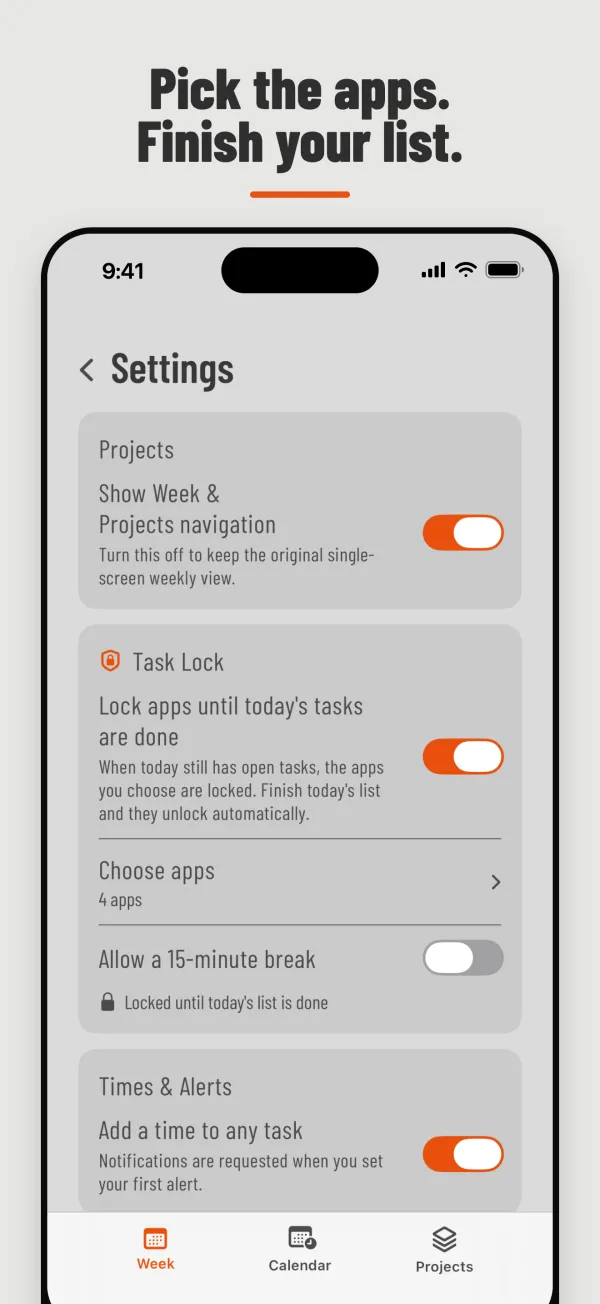
Open Weeklane, tap Settings (the gear), then Task Lock, and choose the apps and websites that eat your day, such as Instagram, TikTok, YouTube or a game. You choose them in Apple's own Screen Time picker.
- 2
Plan today
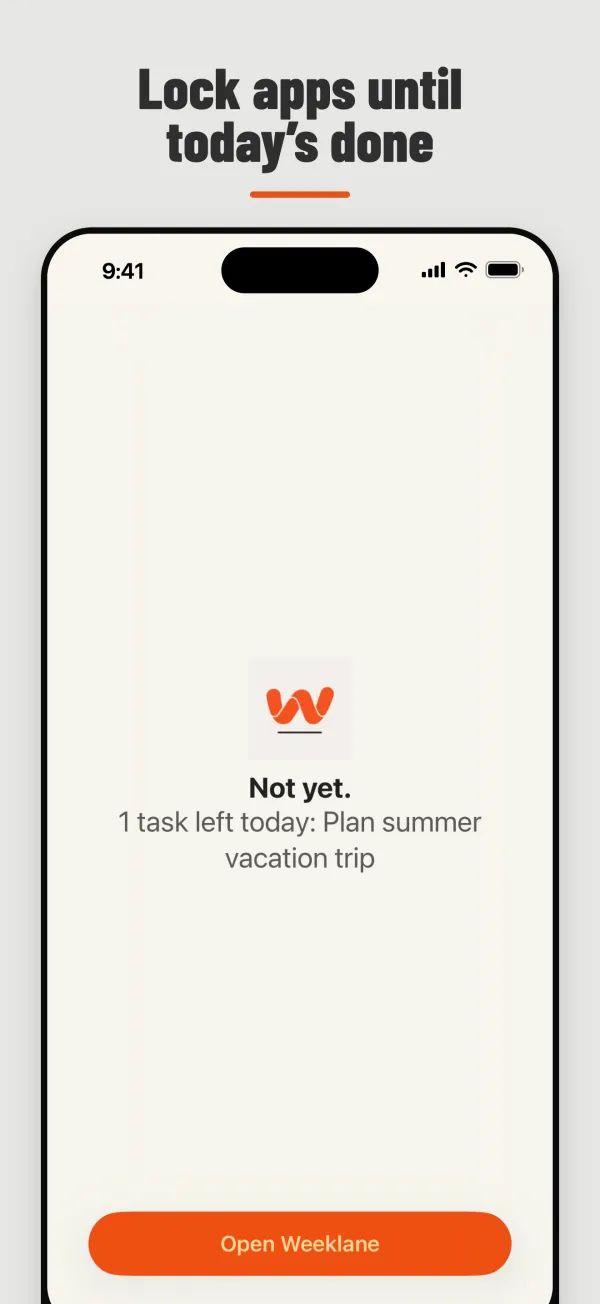
Write today's tasks in Weeklane as usual. While today has open tasks, the apps and sites you picked show a calm lock screen: "Not yet.", how many tasks are left, and a button to open Weeklane.
- 3
Finish your list
Check off the last task for today and everything unlocks automatically. No timer to wait out and no setting to undo. Tomorrow's list starts the cycle again.
The "later today" rule
A task with a time later today does not lock anything until that time comes. "Call the dentist at 16:00" will not block your morning. Tasks without a time count right away. Once a timed task's moment arrives, it counts like any other open task until you check it off. If today has no open tasks, nothing is locked.
A 15-minute break, if you want one
Sometimes you really do need that app for a minute. Switch on "Allow a 15-minute break" and you can open your apps for 15 minutes; then the lock comes back until today's list is done. Prefer it strict? Leave the break off.
Private by design
Task Lock is built on Apple's Screen Time API. You choose apps and websites in Apple's system picker, and iOS hands Weeklane an opaque token instead of app names. Weeklane never sees which apps you use, how long you use them or what you do in them. The lock itself is applied by iOS, so it holds even when Weeklane is closed. Your personal tasks stay in Weeklane as before.
Task Lock vs time limits and focus timers
| What unlocks the apps | Weak spot | |
|---|---|---|
| Screen Time limits | A daily time allowance runs out | On iOS 27, whole categories only, not single apps (iOS 26: Ignore Limit is one tap away) |
| Focus timers and schedules | A timer or a clock | Ends whether or not anything got done |
| Weeklane Task Lock | Finishing today's tasks | Only as honest as the list you write |
New to app blocking? Start with the complete guide to app blocking on iPhone. Comparing approaches rather than features? Read how a to-do list app that blocks apps works (and how it compares with Screen Time limits and focus timers) , or see how Task Lock compares with Opal and one sec.
Availability and price
- Version: since Weeklane 2.5, released on the App Store on 13 October 2026 as "Weeklane: To-Do & App Blocker". Saved block lists and Plan with AI control arrived in Weeklane 3.0 (21 October 2026).
- Devices: iPhone and iPad. Not on Android yet (planned for later).
- Price: Task Lock is part of Weeklane Pro: 7-day free trial, then $4.99/month or $34.99/year (local store pricing applies). Cancel during the trial and you are not charged. The weekly planner itself stays free, and earlier lifetime-unlock owners get Task Lock included.
Frequently asked
What is Weeklane Task Lock?
Task Lock is an app blocker built into the Weeklane to-do list. You choose distracting apps and websites, and they stay locked while today still has open tasks. When you check off the last task for today, they unlock automatically.
Is there a to-do list app that blocks apps until tasks are done?
Yes. Weeklane has Task Lock on iPhone and iPad (since version 2.5): the apps and websites you choose stay locked until today's tasks in Weeklane are checked off.
How do I turn on Task Lock?
Open Weeklane, tap Settings (the gear) and tap Task Lock, the first thing you see there. Allow Screen Time access when iOS asks, then choose the apps and websites to lock in Apple's Screen Time picker. Optionally switch on the 15-minute break.
Can Task Lock block websites?
Yes. Task Lock uses Apple's Screen Time picker, which lets you choose apps, whole app categories and websites. Add a site such as instagram.com and it stays locked along with the apps until today's tasks are done.
What happens with tasks scheduled later today?
A task with a time later today does not lock anything until that time arrives. Your morning is not blocked by an evening task; once its time comes, it counts like any other open task until you check it off.
Can I take a break?
Yes, if you want one. Turn on "Allow a 15-minute break" in Task Lock settings and you can unlock your apps for 15 minutes; after that the lock comes back until today's list is done. Leave it off for a stricter lock.
Can Weeklane see which apps I use?
No. Task Lock uses Apple's Screen Time API. You pick apps and websites in Apple's own system picker, and iOS gives Weeklane an opaque token instead of app names or usage data. Weeklane never sees which apps or sites you choose or how you use them.
Can I save different block lists?
Yes. Since Weeklane 3.0 you can save named block lists, for example one for social apps and one for games, and switch between them. You can also choose to lock only from a set time of day.
Can Claude or ChatGPT control Task Lock?
Yes, with Plan with AI (Weeklane Pro, since 3.0). A connected assistant can tell you whether Task Lock is on and how many tasks are left, turn it on or off, set when the lock starts, allow or turn off breaks, and switch between block lists you saved on your phone. It only sees list names, never which apps are blocked, and it cannot choose apps: that happens on the phone in Apple's Screen Time picker. You can undo the assistant's last change.
Is Task Lock on Android?
Not yet. Task Lock is on iPhone and iPad only for now. An Android version is planned for later. The Weeklane weekly planner itself is available on Android today.
Is Task Lock free?
Task Lock is a Weeklane Pro feature. Pro has a 7-day free trial, then costs $4.99/month or $34.99/year. The weekly planner is free.
Is Task Lock available now?
Yes, since 13 October 2026 (Weeklane 2.5). It is in the current version of Weeklane ("Weeklane: To-Do & App Blocker" on the App Store) for iPhone and iPad. Update or download Weeklane, then tap Settings (the gear) → Task Lock to set it up.
Plan today. Then earn the feed.
Get Weeklane on the App Store, add today's tasks and set up Task Lock under Settings (the gear) → Task Lock. Weeklane Pro starts with a 7-day free trial.
Related guides
- App Blocking on iPhone: The Complete Guide — Screen Time, Focus, Shortcuts and app blockers compared.
- How to Block Instagram Until Your To-Do List Is Done — step by step with Task Lock, plus free alternatives.
- A To-Do List That Blocks Apps Until Your Tasks Are Done — how task-based blockers compare with Screen Time and timers.
- How to Stop Doomscrolling — a to-do-first phone routine.
- Opal Alternative: Weeklane Task Lock vs Opal — schedules and timers vs a to-do list.
- one sec Alternative: Weeklane Task Lock vs one sec — a pause before each app vs a lock until today is done.
- How to Block Apps on iPhone — Screen Time limits and schedules, Focus and Task Lock compared.
- All Weeklane features