How-to guide
Does Google Tasks Have a Weekly View? 3 Workarounds
The short version: not in the Tasks app itself. Google Calendar can show your dated tasks in its week view, and Calendar's full-screen Tasks view can be turned into a simple week board. Here is how each workaround works, and where it falls short.
Published Updated
Google Tasks is a simple, free to-do list that lives in its own app on Android and iPhone and in the side panel of Gmail, Calendar, Drive and Docs. It has lists, starred tasks, dates, times and repeats, but no seven-day layout. Here are three ways to get close, and where each one stops.
The three workarounds at a glance
| Workaround | Shows the week side by side | Tasks without a date | Check off in place |
|---|---|---|---|
| Tasks in Google Calendar's week view | Yes | Not shown | Yes |
| One list per weekday in Calendar's Tasks view | Yes, as columns (web) | Yes, the list is the day | Yes |
| Sort a list by date in the Tasks app | No, one list by date | Still in the list | Yes |
| A weekly planner app | Yes, by design | Depends on the app | Yes |
Workaround 1: tasks in Google Calendar's week view
- Open Google Calendar on a computer.
- In the left panel, under My calendars, make sure Tasks is ticked (open the menu if you do not see the panel).
- Switch to Week view. Tasks with a date appear on their day; tasks with a time appear at that time.
- Click a task to complete it, or drag it to another day.
This is the closest Google gets to a weekly to-do view, and it works in the Calendar app on Android and iPhone too. Google's own rule is the limit: to appear on your calendar, a task must have a date. Undated tasks stay in their list. Tasks also share the screen with every meeting, and if a task slips, it stays on its old day. To find those, open a day and choose Pending tasks, which lists uncompleted tasks from the last 365 days.
Workaround 2: one list per weekday in Calendar's Tasks view
- In Google Tasks, create seven lists: Monday to Sunday.
- Open Google Calendar on a computer and click the Tasks icon at the top right. The full-screen Tasks view shows your lists side by side.
- On Sunday, put each task in the list for the day you will do it. Drag tasks between columns to move them.
- At the end of the week, move what is left into next week's days.
This gives you a real week board without needing dates. The catch: the side-by-side columns are a computer view; on a phone the Tasks app shows one list at a time. Nothing moves unfinished tasks forward for you, and you reuse the same seven lists every week.
Workaround 3: sort a list by date in the Tasks app
In the Google Tasks app, open a list, tap the sort option and choose Date. Tasks are then grouped by their dates. It is the quickest look at the coming days on a phone, but it is one list, and it only covers the list you have open.
When a weekly planner app makes more sense
Google Tasks is built around lists and dates: a task exists, and it may have a date. A weekly planner is built the other way round: the week exists, and you put tasks on its days. That matters if you:
- plan on Sunday which day each task belongs to, without giving everything a date;
- want to see Monday to Sunday at a glance on your phone, not only on a computer;
- want unfinished tasks to move to today rather than stay on yesterday.
| App | What the week looks like | Platforms |
|---|---|---|
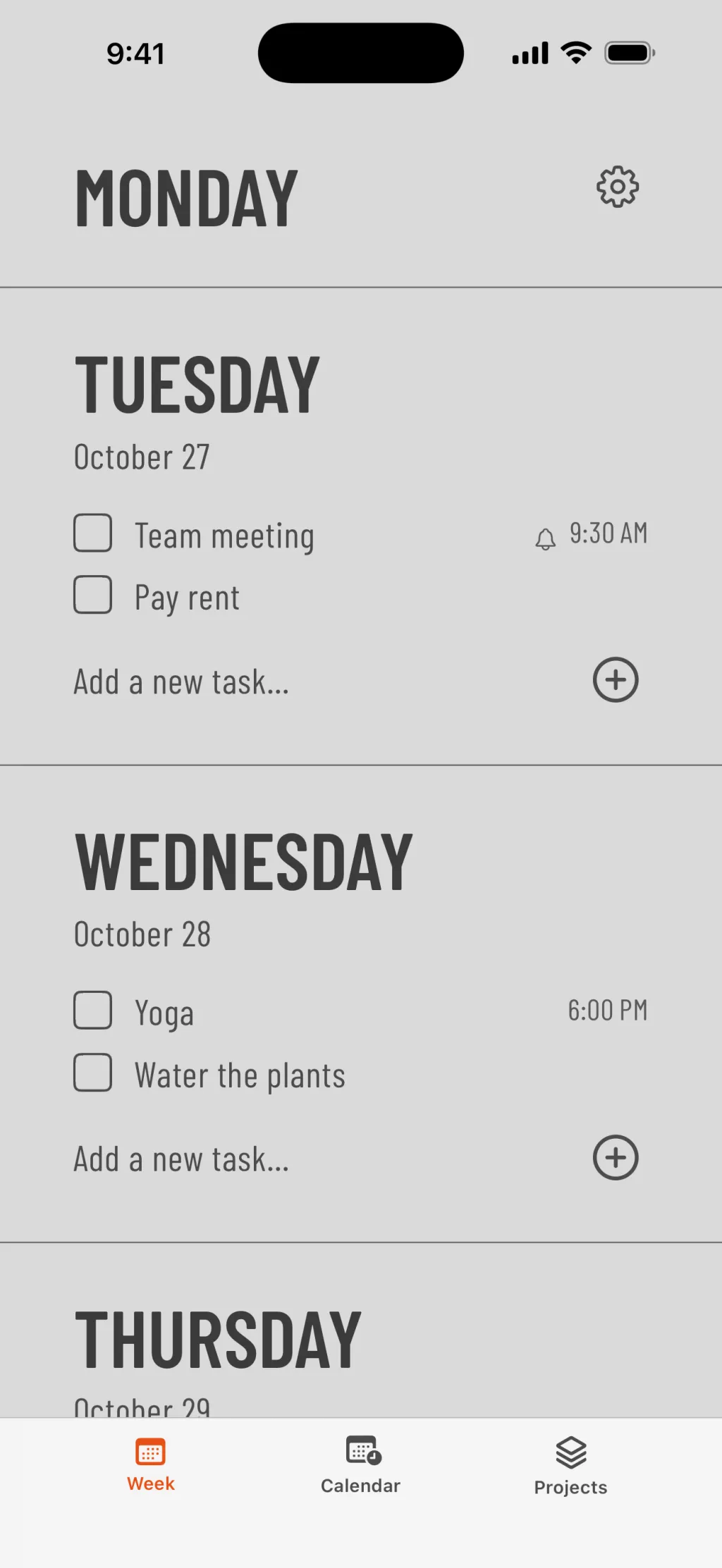
| Weeklane | Seven short day lists, one per day | Android, iPhone, iPad, Mac |
| Tweek | A paper-style week on one screen | Web, iPhone, Android |
| TeuxDeux | Day columns side by side | Web, iPhone |
| WeekToDo | Day columns, free and open source | Windows, Mac, Linux |
Weeklane is our own app: it shows the week as seven short day lists on Android, iPhone, iPad and Mac, with a Home Screen widget on Android and Home and Lock Screen widgets on iPhone, and a setting that moves unfinished tasks to today. It has no web app, and it does not sync with Google Tasks. Reminders, repeating tasks and sync across devices are part of Weeklane Pro. For a wider choice, see the best weekly planner apps of 2026 or, on Android, the simplest to-do apps for Android.
Google Tasks still has real strengths: it is free, it is built into Gmail and Calendar, and you can turn an email into a task in one click. If those matter more than a week layout, the Calendar week view is a good compromise.
Frequently asked questions
Does Google Tasks have a week view?
No. The Google Tasks app shows lists, not a week. Google Calendar's week view can show your tasks next to your events, but only tasks that have a date.
How do I see Google Tasks in Google Calendar's week view?
Open Google Calendar, make sure Tasks is ticked under My calendars in the left panel, and switch to Week view. Tasks with a date appear on their day, and tasks with a time appear at that time.
Why don't some of my tasks show up in Google Calendar?
Google Calendar only shows tasks that have a date. Tasks without a date stay in their list in Google Tasks. Add a date to show them on the calendar.
Can I see all my Google Tasks lists side by side?
Yes, on a computer. In Google Calendar, click the Tasks icon at the top right to open the full-screen Tasks view, which shows your lists next to each other. With one list per weekday, that works as a simple week board.
Can Google Tasks repeat?
Yes. Open a task's date and time and choose Repeat. Google notes that tasks with subtasks can't repeat.
Is there a weekly planner app that works like Google Tasks but shows the week?
Several apps are built around a week view, such as Tweek, TeuxDeux, WeekToDo (desktop) and Weeklane (Android, iPhone, iPad and Mac). They show each day as its own list, so you plan tasks onto days instead of by date.
A to-do list that starts with the week
Weeklane shows your week as seven short day lists on Android, iPhone, iPad and Mac, with a Home Screen widget. The weekly planner is free; Weeklane Pro adds reminders, repeating tasks, sync across devices and read-only calendar events, with a 7-day free trial.
Scan to download
Related guides
- Does Microsoft To Do Have a Weekly View? 3 Workarounds — the same question for Microsoft To Do, with three workarounds.
- Does Apple Reminders Have a Weekly View? 3 Workarounds — the same question for Apple Reminders.
- Best Simple To-Do List App for Android — what makes an Android to-do app simple, and how to set one up.
- Best Weekly Planner Apps (2026): Honest Picks by Use Case — ten weekly planner apps compared, Google Tasks included.
- How to Plan Your Week in 5 Minutes (Simple Weekly Method) — how to plan the week in five minutes, whatever the app.
- Guides