Template + app comparison
Weekly Work Plan: Free Template and the Best Apps to Run It
A one-page plan for the next five working days: three goals, your fixed meetings, and a short list per day. Here is the template, the 15-minute method, and the apps that do it well.
Published Updated
Short answer: a weekly work plan is one page that covers the next five working days. It lists up to three goals for the week, your deadlines and fixed meetings, and a short task list for each day, with one daily focus. Make it in 15 minutes on Friday afternoon or Monday morning. Print the free template below, or run it in an app with a real week view. Weeklane suits a personal plan on your phone; Todoist, Microsoft Planner or Trello suit bigger task lists and teams.
Free weekly work plan template (PDF)
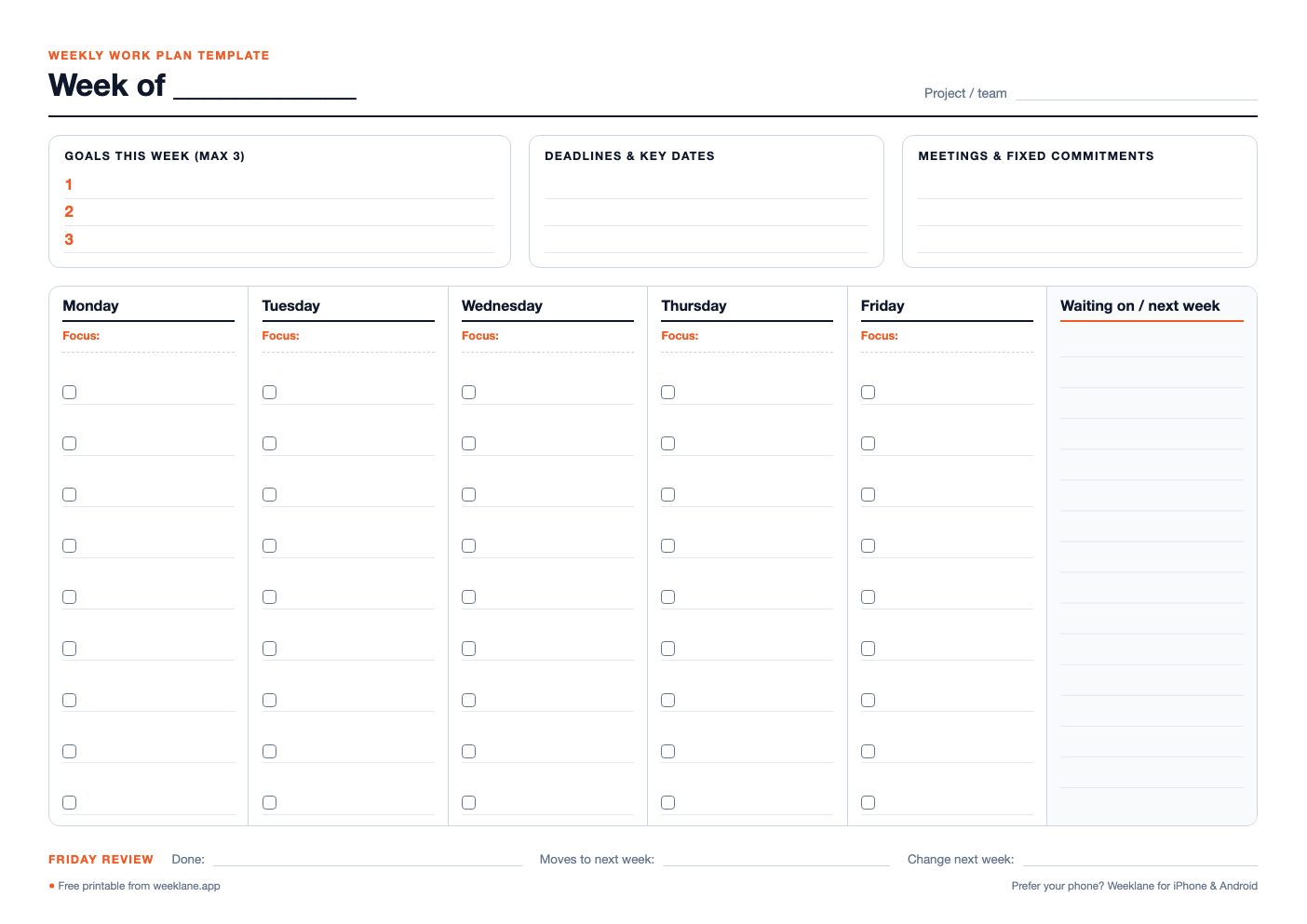
Weekly work plan template
Three weekly goals, deadlines and fixed meetings on top; Monday to Friday columns with a daily focus and task checklist; a Friday review line.
The template is landscape, one page per week, in A4 and US Letter. It has three goal lines, boxes for deadlines and meetings, Monday to Friday columns (each with a focus line and nine task checkboxes), a "waiting on / next week" column and a Friday review line. If you also need hours, pair it with the weekly time blocking template.
What goes into a weekly work plan
- Up to three goals. Outcomes, not activities: "send the Q4 proposal", not "work on proposal". Three is the ceiling, not the target.
- Deadlines and key dates. Anything due this week or early next week, so it does not surprise you on Thursday.
- Fixed commitments. Meetings, calls, travel. These set how much time is actually left.
- One focus per day. The one thing that makes the day a success. Everything else on that day supports it or waits.
- A short task list per day. Five to seven tasks per day is realistic for most people. If a day has twelve, two of them are next week's.
- Waiting on. Things other people owe you. Writing them down stops them from blocking your plan silently.
- A Friday review. What got done, what moves, what to change next week. Two minutes, and it feeds the next plan.
Once the week has a shape, give the days one: our guide to time blocking and the free time-blocking planner turn the plan into hours, and the Ivy Lee method keeps each day to six ranked tasks. A 15-minute Sunday reset is the easiest moment to write the plan.
How to make a weekly work plan in 15 minutes
- Empty your head (3 min). List everything on your plate this week: tasks, follow-ups, half-finished work, things you promised people.
- Pick up to three goals (2 min). Which outcomes would make this a good week? Write them at the top.
- Add the fixed stuff (2 min). Copy deadlines and meetings from your calendar into the template.
- Give each day a focus (2 min). Put the heaviest goal work on the days with the fewest meetings.
- Distribute the tasks (4 min). Five to seven per day, the focus task first. Anything that does not fit goes to "next week", deliberately.
- Leave Friday light (1 min). Friday afternoon absorbs overruns and holds the review.
- Review on Friday (1 min). Tick, move, and note one thing to change. That note shapes next week's plan.
Example weekly work plan
| Day | Focus | Tasks (sample) |
|---|---|---|
| Monday | Plan + clear inbox | Weekly plan, reply to client emails, 1:1 with manager |
| Tuesday | Proposal draft | Outline proposal, gather numbers, write sections 1–2 |
| Wednesday | Proposal finish | Sections 3–4, design pass, send for internal review |
| Thursday | Meetings + feedback | Team meeting, apply review comments, prep Friday demo |
| Friday | Ship + review | Send proposal, demo, weekly review, draft next week |
Weekly work plan apps compared
Paper is great for thinking; an app is better for moving unfinished tasks, reminders, and seeing the plan on your phone. Here is how the common options compare for a weekly work plan specifically.
| App | Best for | Week view | Teams | Price |
|---|---|---|---|---|
| Weeklane | A personal weekly plan on your phone | Yes: the whole app is seven day lists, plus Home Screen widgets | Shared projects (Pro creates, invited members join free) | Free weekly planner; Pro with a 7-day free trial |
| Todoist | Large task lists with projects, labels and filters | Upcoming view by day | Shared projects and team workspaces | Free plan; paid plans |
| Microsoft Planner | Teams already on Microsoft 365 | Schedule view on plans | Built for teams | Included with many Microsoft 365 business plans |
| Trello | Visual boards for team workflows | Calendar view or Power-Up | Built for teams | Free plan; paid plans |
| Notion | A custom work plan database you design yourself | Calendar or board views you set up | Yes | Free plan; paid plans |
| Google Calendar | Meetings and time blocks | Yes, by hour | Shared calendars | Free |
| Printable template | Thinking on paper, zero setup | Yes, on one page | No | Free |
Where Weeklane is the better choice
If the plan is yours (not a team board), and you mostly check it on your phone, Weeklane is the shortest path from the template to an app. Each weekday is already a list, today's tasks sit on your Home Screen in a widget, unfinished tasks are easy to move to tomorrow, and personal tasks stay on your device without an account. Write the day's focus as the first task.
Where other apps are better
If your work plan is shared by a team with assignees, dependencies and reporting, use a team tool such as Microsoft Planner, Trello or Notion. If you manage hundreds of tasks across many projects with labels and filters, Todoist is stronger. If your week is mostly meetings, plan it in your calendar and keep a short task list next to it.
Frequently asked
What is a weekly work plan?
A one-page plan for the next five working days: up to three goals, deadlines and fixed meetings, one focus per day and a short task list for each day. It sits between a long to-do list and an hour-by-hour schedule.
Is the weekly work plan template free?
Yes. The weekly work plan template is a free PDF in A4 and US Letter, with no email or sign-up. Print it, or write on it in a PDF app on a tablet.
What is the best app for a weekly work plan?
For a personal plan you check on your phone, a simple week-view planner such as Weeklane works well. For large task lists, Todoist. For team plans with assignees, Microsoft Planner, Trello or Notion.
How many tasks should a weekly work plan have?
Up to three weekly goals and about five to seven tasks per day. If the plan only works when nothing goes wrong, it has too many tasks.
Should I plan my work week on Friday or Monday?
Friday afternoon is better if you can: the week's loose ends are fresh, and Monday starts with a plan instead of planning. Monday morning works if Friday is always busy.
Run your weekly work plan on your phone
Seven short day lists and Home Screen widgets on iPhone and Android. Free weekly planner, with a 7-day free trial of Weeklane Pro.

Scan to download
Related guides
- Free Time Blocking Templates: Daily & Weekly (PDF) — free daily and weekly time blocking templates (PDF).
- Weekly Planner App: How to Plan Your Week in 5 Minutes — the five-minute routine to plan your week in any app.
- Sunday Reset Routine: A 15-Minute Weekly Checklist — the 15-minute reset that closes last week.
- Ivy Lee Method: The 6-Task Daily Productivity System — choose each day's six most important tasks.
- Weeklane vs Todoist: A Simpler Todoist Alternative — an honest Weeklane vs Todoist comparison.
- Time Blocking: What It Is & How to Do It — turn the weekly plan into time blocks.
- How to Brain Dump to AI and Get a To-Do List for the Week — turn a messy list into a plan for the week with AI.
- Guides