AI setup guide
To-Do List Apps That Work Inside ChatGPT
ChatGPT can work in a real to-do app, not just write lists in the chat. Here is which to-do apps you can use inside ChatGPT today and how each one connects, then the full setup for one of them, what ChatGPT can do with your tasks, and what to check when it doesn't work.
Published Updated
To-do apps that work inside ChatGPT, compared
We checked each vendor's own help page on 13 November 2026 and list only what those pages say. Weeklane is our own app. Features differ by plan on both sides, so follow the links before you choose.
| To-do app | How it connects | What ChatGPT can do | Notes |
|---|---|---|---|
| Todoist | Its own app in ChatGPT's directory ([Todoist help](https://www.todoist.com/help/articles/use-chatgpt-with-todoist-app-ZvyCjjtmj)) | Look up tasks and projects, create them, and update them (rename, reschedule, move) | Works on Todoist's free and paid plans; ChatGPT permissions depend on your ChatGPT plan |
| Any.do | Its own ChatGPT plugin ([Any.do help](https://support.any.do/en/articles/9760938-any-do-chatgpt)); a separate MCP server is in beta | Find tasks, add tasks and subtasks, create lists, set reminders, read and add calendar events; edits go through a review step | Free for all Any.do users; set it up on the web or desktop, then it works in the mobile app |
| TickTick | TickTick's own MCP server ([TickTick help](https://help.ticktick.com/articles/7438129581631995904)) | Search, create, update, complete and delete tasks | If TickTick is not in Plugins for you, adding an MCP server with write actions needs a Business, Enterprise or Edu workspace |
| Notion | Its own app in ChatGPT's directory ([Notion help](https://www.notion.com/help/use-notion-pages-in-chatgpt)) | Search and read pages; may create or update pages, depending on workspace settings | A workspace tool rather than a to-do app; good if your tasks already live there |
| Weeklane | Its own plugin in [ChatGPT's directory](https://chatgpt.com/plugins/plugin_asdk_app_6ad9234fc8f081918c7feb642e79a4da) | Read the week, add, move, complete and delete tasks, set repeats and reminders, undo the last change | Needs Weeklane Pro (7-day free trial); the week syncs to iPhone, iPad, Mac and Android |
| Microsoft To Do, Google Tasks, Apple Reminders | No ChatGPT app as of November 2026 | Only through an automation service such as Zapier, set up outside ChatGPT | Apple's iCloud plugins in ChatGPT cover Mail and Calendar, not Reminders |
How to choose: if you already use Todoist, Any.do or Notion, install that app's plugin and keep your list where it is. If you want ChatGPT to plan by the week, a planner built around seven day lists, such as Weeklane, makes the result easy to see on your phone. The rest of this page is the full setup, using Weeklane as the example; the steps are much the same for any plugin.
This is the hands-on part: which ChatGPT plans and apps support what, the exact setup, what ChatGPT can and cannot do with your tasks once connected, the permission settings worth changing, and what to check when it does not work. If you are still deciding whether you need a connected app at all, start with Can ChatGPT manage your to-do list?, which compares prompts, Scheduled tasks and a connected planner.
Your options in ChatGPT, compared
There are four realistic ways to get a to-do list "into" ChatGPT. Only two of them let ChatGPT change a real list on your phone.
| Option | What ChatGPT can do | Plans | Where |
|---|---|---|---|
| A plugin from ChatGPT's directory (Weeklane, Todoist and others) | Read, add, move, complete and delete tasks in the app, with approval prompts | The directory is on every plan; whether a plugin installs depends on plan, region and workspace | Web, desktop, iPhone and Android |
| A custom MCP server (any app that has one) | Whatever the server offers, including write actions | Business, Enterprise and Edu (admins, or members they allow). Pro: read and fetch only | Web only |
| Scheduled tasks (built in) | Run a prompt at a set time and notify you. No list, no checkboxes | All plans. Active tasks: 3 on Free and Go, 5 on Plus, 10 on Business and Edu, 15 on Pro and Enterprise | Web and mobile; desktop depends on app version |
| Copy and paste | Sort and plan the text you paste. Nothing reaches your app | All plans | Everywhere |
Two things people often expect that are not there today. Apple Reminders has no ChatGPT plugin: OpenAI's iCloud plugins cover Mail and Calendar, and its help page says a standalone Reminders plugin is outside that launch. And Scheduled tasks are not a to-do list: they are prompts that run later, with limits per plan (OpenAI: Scheduled tasks). Automation services that pass text between ChatGPT and a to-do app exist too, but they move data one way and you set them up outside ChatGPT, so they are not covered here.
Which ChatGPT apps support what
| chatgpt.com | Desktop app | iPhone and Android apps | |
|---|---|---|---|
| Browse Plugins and install one | Yes | Yes | Yes |
| Use a connected to-do app in a chat | Yes | Yes | Yes (in voice chats, support varies by app) |
| Add a custom MCP server | Yes, on eligible plans | No | No |
| Scheduled tasks | Yes | Depends on app version; use the web if Scheduled is missing | Yes, and create the task there to get push notifications |
A connection belongs to your ChatGPT account, not to one device. Connect once on the web or in the app, and the plugin is there wherever you are signed in to the same account and workspace. If you use a work workspace and a personal account, they each need their own connection.
Step by step: connect Weeklane to ChatGPT
Weeklane is listed in ChatGPT's Plugins directory, so there is nothing to paste. Before you start, check the Weeklane side: you need Weeklane 3.0 or later, sign-in with Apple or Google in the app, and Weeklane Pro (lifetime unlock included; new subscribers get a 7-day free trial). Use the same Apple or Google account below that you use in the app, or ChatGPT will connect to an empty week.
Step 1: Open Plugins
Sidebar → PluginsOn chatgpt.com, in the desktop app or in the mobile app, open Plugins in the sidebar. Or skip the search and open Weeklane's listing directly.
Step 2: Find Weeklane and install it
Search for "Weeklane", open the listing, check what it includes, then click Install plugin.
Step 3: Sign in and allow
When ChatGPT asks you to connect, sign in with the Apple or Google account you use in Weeklane and click Allow. The sign-in happens on Weeklane's own page, never in the chat.
Step 4: Choose how often ChatGPT asks first
Settings → Plugins → PermissionsPick a permission level (see the table further down). "Allow read actions" is a good start: ChatGPT can read your week freely and still shows an approval card before every change.
Step 5: Test with one read and one write
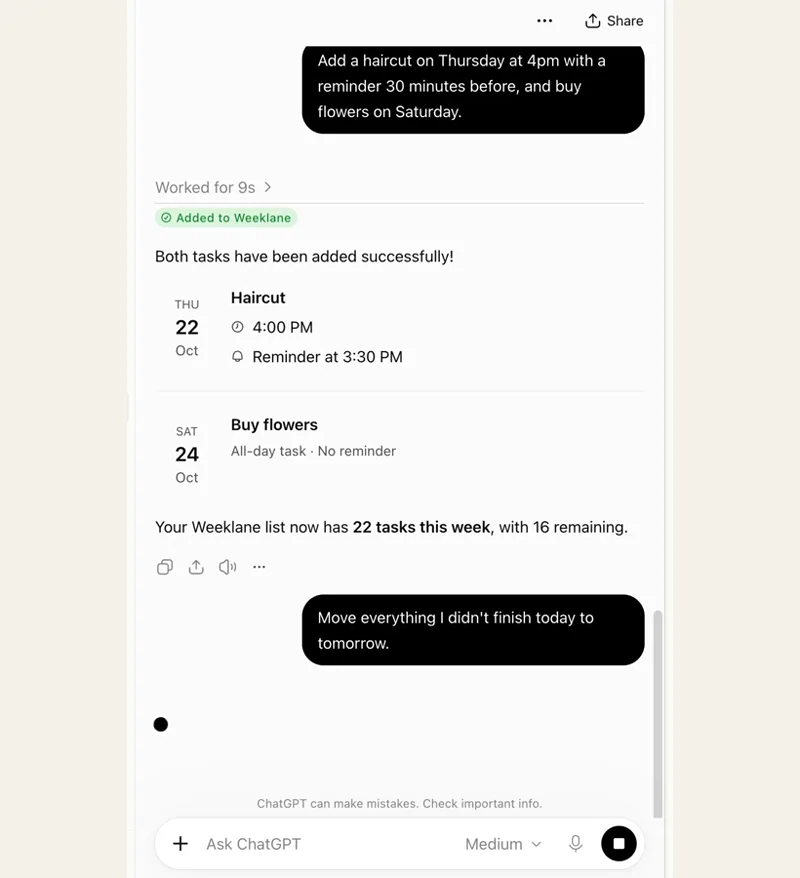
In a new chat, type @Weeklane and ask "What's on my week?". Compare the answer with the app. Then ask it to add one test task to tomorrow, check that it appears on your phone, and say "undo that".
If your plan allows it: add Weeklane as a custom MCP server
You only need this if the plugin is not available to you but your workspace lets you add custom MCP servers. OpenAI offers that, with write actions, to Business, Enterprise and Edu workspaces on chatgpt.com; Pro accounts can connect custom servers for reading only (OpenAI: custom MCP servers).
- Open Plugins on chatgpt.com, select the plus button, then Add custom MCP server.
- Name it Weeklane and enter the server URL https://mcp.weeklane.app/mcp.
- Choose OAuth as the authentication, read the risk warning and tick the box to continue.
- Create it as a plugin, install it, and sign in with your Weeklane account. In a Business workspace only admins and owners can create and publish it for others.
What ChatGPT can do in Weeklane once connected
The Weeklane plugin gives ChatGPT a fixed set of actions. Knowing them helps you ask for things it can do in one step, and stops you asking for things it cannot do at all.
| You ask | What happens | Good to know |
|---|---|---|
| "What's on my week?" | Reads seven days, starting on the first weekday you chose in the app | The answer includes today's date and your time zone, so ChatGPT stops guessing dates |
| "What's left today?" | Reads one day in the order you see it | Also works for any date |
| "What's in my Backlog?" | Reads tasks that have no day yet | Useful before planning: ChatGPT can pick tasks from it |
| "When is the dentist?" | Searches task titles from 30 days back to a year ahead, plus the Backlog and repeating tasks | Returns up to 50 matches |
| "Add these to next week" | Adds up to 50 tasks in one go, each with an optional time and phone reminder, or to the Backlog | A reminder can be a set number of minutes before, or a clock time such as 20:00 the evening before |
| "Move Thursday's tasks to Friday" | Moves a whole day, or specific tasks | By default only unfinished tasks move |
| "I did the laundry and the bills" | Ticks tasks off, or reopens them | With Task Lock on, ticking off the last task can unlock your apps |
| "Gym every Monday at 7" | Creates, changes or stops daily and weekly repeating tasks, or skips one day | Daily and weekly only; changes apply from a day you choose onwards |
| "Turn on Task Lock from 9" | Turns [Task Lock](/task-lock) on or off, sets its start time and breaks, switches between saved block lists | iPhone and iPad only. ChatGPT never sees which apps are blocked |
| "Undo that" | Reverts ChatGPT's last change, all of it, even a bulk change | Tasks you edited in the app since are left alone |
What it cannot do: see or change shared projects (only your personal tasks), add calendar events, choose the apps Task Lock blocks, or change more than 50 tasks in one call.
Approval prompts: when ChatGPT asks before it acts
Before an action runs, ChatGPT can show an approval card naming the app and what it is about to do. How often you see one depends on the permission level you choose under Settings → Plugins → Permissions, or per app (OpenAI: app permissions). Some menus shorten the labels.
| Permission level | What it means for your to-do list | Use it when |
|---|---|---|
| Always ask | A card before ChatGPT even reads your week | You want to see every call, for example the first day |
| Allow read actions | Reads freely; asks before adding, moving or ticking off | Most people, most of the time |
| Allow low-risk actions | ChatGPT approves what it rates as low-risk; riskier actions still ask or are refused | You plan with it daily and the cards slow you down |
| Allow all actions | No more cards for supported actions. Only offered per app or account | Rarely. Weeklane's undo helps, but a wrong bulk move still lands on your phone |
On an approval card you can usually Deny, Allow once, or allow similar actions from then on. Weeklane adds its own guard: it tells ChatGPT to confirm in the chat before deleting tasks, stopping a repeating task or moving many tasks you did not clearly ask about. For a big change, ask for a preview anyway: "Show me the list first and wait for my OK."
Privacy: what each side can see
- What ChatGPT sees: the results of the actions it runs, which means your personal tasks (titles, days, times, reminders, done or not), your repeating tasks, your Backlog and Task Lock's settings. Not shared projects, and not the names of the apps Task Lock blocks.
- What Weeklane sees: the requests ChatGPT sends. OpenAI says apps may also get relevant context from the conversation and from Memory, plus basic details like approximate location (OpenAI: connected apps).
- Model training: on Free, Go, Plus and Pro, OpenAI may use information accessed from apps to train its models if "Improve the model for everyone" is on in your ChatGPT settings. On Business, Enterprise and Edu it does not by default.
- Memory: with Memory on, ChatGPT may remember things it read from your list. Keep anything you would not want remembered out of task titles.
- A record of every change: Weeklane lists each AI change under Settings → Plan with AI, and tasks an assistant added carry a small label in the app.
- Weeklane's side: Weeklane does not sell your tasks or use them to train AI; OpenAI's own terms and your ChatGPT data settings apply to the conversation.
How to disconnect
- In ChatGPT: open Settings → Plugins, select Weeklane and choose Disconnect (under Connected accounts or the ••• menu). Uninstalling the plugin also disconnects it (OpenAI: managing app accounts).
- In Weeklane: open Settings → Plan with AI and tap Revoke next to ChatGPT. This works even if you no longer have access to the ChatGPT account.
- Clean up if you want to: disconnecting does not delete old chats or memories in ChatGPT; remove those separately.
Troubleshooting
| Problem | Likely cause | Fix |
|---|---|---|
| Weeklane does not show up in Plugins | Plan, region or workspace rules, or an old app version | Open the [direct listing](https://chatgpt.com/plugins/plugin_asdk_app_6ad9234fc8f081918c7feb642e79a4da), update the ChatGPT app, or switch from a work workspace to your personal account |
| "Disabled by admin" | Your workspace admin controls plugins | Ask the admin, or connect from a personal ChatGPT account |
| ChatGPT writes a list in the chat instead of adding it | It did not pick the plugin for that message | Start the message with @Weeklane, or choose it from the + menu, and say "add to Weeklane" |
| It says your week is empty | You signed in with a different account than in the app, or Weeklane Pro is not active | Check Settings → Account in Weeklane, then disconnect and connect again with that account |
| Tasks land a day off | A relative date was read differently | Ask it to read your week first, or give dates: "Tuesday 17 November" |
| Changes do not appear on your phone | The app is signed out or offline | Open Weeklane, check you are signed in, and give it a few seconds to sync |
| Task Lock requests fail | Task Lock is not set up on the phone yet | Set it up once in Weeklane on iPhone or iPad, with at least one saved app list |
| No option to add a custom MCP server | Your plan or device does not offer it | Use the plugin from the directory; custom servers are web only, on eligible plans |
Good first prompts
Start with reading, then one small change, then a whole week. These cover most of what people use it for:
- “@Weeklane What's on my week? Flag any day with more than four tasks.”
- “Add these to next week, but show me the days first and wait for my OK: …”
- “Move everything I didn't finish today to tomorrow, except the gym.”
- “Put "renew passport" in my Backlog, no day yet.”
- “No gym this Friday, I'm travelling.”
- “Make "bins out" repeat every Wednesday with a reminder at 19:30.”
- “Turn on Task Lock from 9:00 with my Social list.”
- “Undo that.”
Once that works, use it for the whole week: how to plan your week with ChatGPT has a Sunday routine with copy-paste prompts and a worked example, and brain dump to AI turns a messy list into tasks first. Using Claude as well? The same Weeklane account works there; see how to connect your to-do list to Claude.
Frequently asked questions
Which to-do list apps work inside ChatGPT?
As of November 2026, Todoist, Any.do and Weeklane have their own apps in ChatGPT's Plugins directory, Notion has an app for pages, and TickTick offers an MCP server. Microsoft To Do, Google Tasks and Apple Reminders have no ChatGPT app.
Can I connect my to-do list to ChatGPT for free?
On the ChatGPT side, the Plugins directory is open on every plan, including Free, though whether a specific plugin installs depends on your plan, region and workspace. Custom MCP servers are not offered on Free. On the app side, Weeklane's Plan with AI needs Weeklane Pro, which has a 7-day free trial.
Does it work in the ChatGPT app on iPhone and Android?
Yes. You can install plugins from Plugins in the mobile apps and use a connected to-do app in any chat there. The connection belongs to your ChatGPT account, so connecting once on any device is enough. Adding a custom MCP server is the exception: it is web only.
Can ChatGPT add tasks to Apple Reminders?
Not directly, as of November 2026. OpenAI's iCloud plugins cover Mail and Calendar, and its help page says a standalone Reminders plugin is outside that launch. Use a to-do app from the Plugins directory instead, or ChatGPT's Scheduled tasks if you only need ChatGPT itself to notify you.
What is the difference between ChatGPT Scheduled tasks and a to-do app plugin?
Scheduled tasks run a prompt at a set time and send you a notification, with a cap on active tasks per plan. They are not a list you can tick off or move. A to-do app plugin lets ChatGPT read and change the list in your app, and the app sends its own reminders.
Will ChatGPT change my tasks without asking?
That depends on your permission level in Settings → Plugins → Permissions. With Always ask or Allow read actions, ChatGPT shows an approval card before every change. Weeklane also tells ChatGPT to confirm before deleting tasks, stopping a repeating task or making large changes you did not clearly ask for, and any change can be undone.
Can ChatGPT see my shared projects or which apps Task Lock blocks?
No. ChatGPT works with your personal Weeklane tasks only. For Task Lock it can see and change the settings (on or off, start time, breaks, which saved list is active) but never which apps are in a list.
Why can't I add a custom MCP server in ChatGPT?
OpenAI offers custom MCP servers with write actions to Business, Enterprise and Edu workspaces on chatgpt.com, where admins decide who may add them. Pro accounts can connect them for reading only, and the mobile and desktop apps cannot add them. For Weeklane, the plugin from the directory does the same job.
Connect ChatGPT to a weekly planner
Weeklane shows your week as seven short day lists on iPhone, iPad, Mac and Android. The weekly planner is free; Plan with AI is part of Weeklane Pro.


Scan to download
Related guides
- How to Plan Your Week With ChatGPT — a weekly routine with copy-paste prompts, once ChatGPT is connected.
- Can ChatGPT Manage Your To-Do List? 3 Setups That Work — prompts, Scheduled tasks or a connected app: which setup you need.
- How to Connect Your To-Do List to Claude (3 Ways) — the same setup in Claude, three ways.
- How to Brain Dump to AI and Get a To-Do List for the Week — turn a messy brain dump into a week first.
- An App That Locks Your Apps Until Your To-Do List Is Done — how a to-do list that blocks apps works.
- Weeklane vs Todoist: A Simpler Todoist Alternative — Weeklane vs Todoist, two apps with ChatGPT plugins.
- Guides